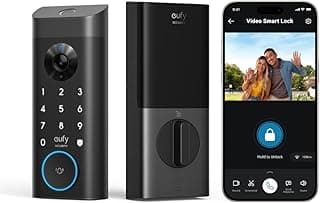
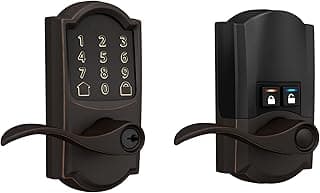
Buying Guide: Finding the Right WiFi Smart Lock for Your Needs
Choosing a WiFi smart lock often feels overwhelming with options promising seamless access and security, but many buyers worry about compatibility with their door, setup complexity, or if it truly enhances safety without adding hassle. This guide breaks down the key factors to consider, helping you match features to your lifestyle and avoid common pitfalls.
WiFi Connectivity and Range
WiFi enables remote locking, unlocking, and monitoring from anywhere, but signal strength matters for reliable performance. If your router is far from the door or walls interfere, a weak connection can lead to delays or failed commands during critical moments.
- Opt for locks supporting 2.4GHz WiFi bands, which offer better range and wall penetration than 5GHz.
- If your home has spotty coverage, pair with a WiFi extender or choose models with built-in signal boosters.
- Avoid relying solely on Bluetooth for remote access—it's fine for local use but limits you inside the home.
Compatibility with Your Door and Existing Hardware
Not every smart lock fits all doors, so checking dimensions early prevents returns. Mismatched setups can compromise security or require professional help.
- Measure your door's thickness (1.375–1.75 inches is standard) and backset (2.125 or 2.375 inches).
- If you have a deadbolt already, select retrofit models that work over it; for handle replacements, ensure lever or knob compatibility.
- For renters or non-standard doors, look for surface-mount or portable options that avoid permanent changes.
Power Source and Battery Life
Dead batteries can lock you out, so reliable power is non-negotiable for daily use. Most run on batteries, but options vary in longevity and convenience.
- Choose models with 6–12 months battery life under normal use to minimize swaps.
- If convenience matters, pick ones with USB charging ports or keypads that double as power banks.
- Always verify low-battery alerts via app notifications—test them during setup.
Unlock Methods and User Management
Multiple access ways suit different households, from keyless entry for families to temporary codes for guests. The goal is flexibility without sacrificing control.
- If sharing access often, prioritize PIN keypads, app codes, or auto-unlock via geofencing.
- For high-traffic homes, fingerprint scanners speed things up but check capacity (e.g., 10–50 users).
- Avoid locks limited to one method if your needs vary—combine app, keypad, and physical keys as backup.
Security Features and Encryption
Smart locks should enhance, not undermine, security. Focus on features that deter break-ins and protect data.
- Look for AES 128-bit encryption for app communications and anti-drill/reverse pins on the deadbolt.
- If privacy is key, enable activity logs and two-factor authentication for remote access.
- In most cases, models with built-in alarms for tampering provide peace of mind without extra costs.
Installation Ease and Tools Required
Many fear installation, but most WiFi smart locks are DIY-friendly, taking 15–30 minutes with basic tools. Skipping this step saves on pro fees.
- If you're handy, choose keyed cable designs needing just a screwdriver.
- For mortise locks or complex setups, confirm included templates and video guides.
- Renters: Surface-mount or adhesive options install in minutes without door alterations.
Durability, Weather Resistance, and Cost Considerations
Outdoor exposure demands rugged builds, while balancing upfront and ongoing costs ensures value.
- Select IP65-rated or higher for weatherproofing if front-door mounted.
- Factor in subscription fees for advanced features—free basics suffice for most users.
- Generally, spending $150–300 gets reliable performance; cheaper models may skimp on battery or WiFi stability.
Frequently Asked Questions About the Best WiFi Smart Locks
What is the typical cost of a good WiFi smart lock?
Most reliable WiFi smart locks range from $150 to $300, depending on features like keypads or cameras. If you're on a budget, basic models under $200 offer solid remote access without extras. Factor in occasional subscription fees for advanced features, but many work great without them for everyday use.
Are WiFi smart locks safe and secure for my home?
Top WiFi smart locks use encryption and auto-locking to prevent unauthorized entry, often more secure than traditional keys that can be copied. In most cases, they alert your phone instantly if someone tampers with the door. Choose models with regular firmware updates to stay protected against new threats.
How easy is installation for a WiFi smart lock?
Installation usually takes 20-30 minutes with basic tools like a screwdriver, replacing your existing deadbolt without major door modifications. If your door has a standard setup, it fits right in; otherwise, check compatibility first. Many include video guides, making it renter-friendly in most apartments.
How does a WiFi smart lock compare to Bluetooth or keypad-only models?
WiFi smart locks stand out for true remote control from anywhere, unlike Bluetooth ones limited to nearby phones. They're more efficient for sharing access with guests temporarily via app. Keypad models save battery but lack notifications unless paired with WiFi hubs.
What's the battery life and efficiency of the best WiFi smart locks?
Expect 6-12 months on standard batteries, with low-battery warnings sent to your app. WiFi usage drains power faster than non-connected locks, but features like motion-only connectivity help extend life. Keep spares handy, as heavy remote use might require changes every few months.
Conclusion
Choosing the best wifi smart lock comes down to reliable connectivity, strong security features, and seamless app integration that fits your lifestyle. We've covered the essentials: easy remote access, robust encryption, and compatibility with your existing setup.
With these factors in mind, you're well-equipped to make a confident decision. Consider your specific needs—like battery life or voice control—and select the model that aligns best. Upgrading to a wifi smart lock enhances your home's security without complexity. Take the next step today for peace of mind.