
Buying Guide: Finding the Right Stack Paper Cutter for Your Needs
When shopping for stack paper cutters, many buyers feel overwhelmed by options ranging from small desktop models to heavy-duty machines. A common concern is whether a cutter can reliably handle your workload without safety risks or excessive costs. This guide breaks down the key factors to consider, helping you match a cutter to your real-world needs like office bulk cutting or craft projects.
Cutting Capacity and Stack Height
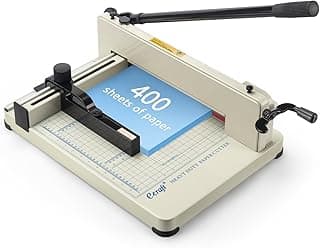
Stack paper cutters shine when they match your volume—think reams of paper for mailings or school supplies. Capacity determines how many sheets (up to 500 in larger models) you can cut at once, saving time on repetitive tasks.
- If you process under 100 sheets occasionally, a compact cutter with 50-100 sheet capacity works well for desks.
- For frequent high-volume jobs, opt for 300+ sheet stacks to avoid multiple passes.
- Avoid overbuying: Larger capacities add bulk and cost if your needs are light.
Blade Type and Cutting Precision
The blade affects clean edges and longevity. Guillotine-style blades offer straight cuts for stacks, while rotary options suit smaller, precise work. In daily use, a sharp, replaceable blade prevents jagged results that waste paper.
- Choose guillotine blades if you prioritize speed on straight stack cuts.
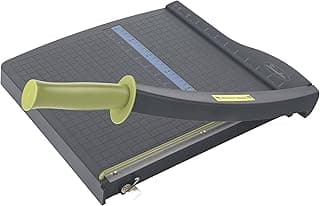
- Select rotary for curved or detailed trims, though they handle fewer sheets.
- Look for models with easy blade swaps—dull blades lead to frustration and errors.
Safety Features
Safety matters most with stack cutters, as blades can pinch fingers during heavy use. Modern designs reduce accidents without complicating operation.
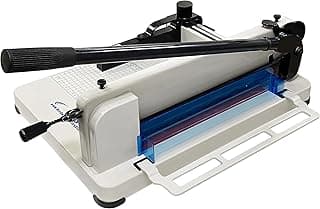
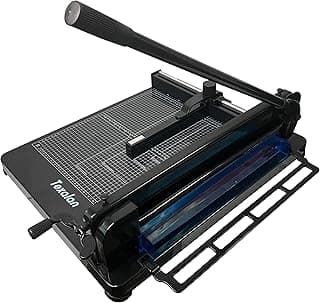
Key features include blade guards, magnetic holds, and clear shields. If your team includes beginners or kids, prioritize double-sided guards and auto-lock mechanisms. These add minimal cost but provide peace of mind, especially in shared spaces.
Build Quality and Durability
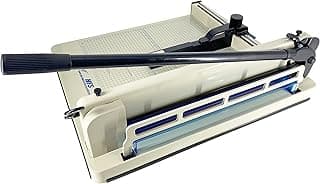
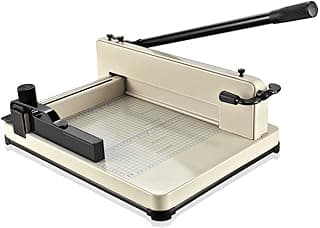
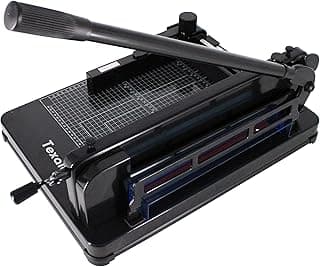
A sturdy frame withstands repeated use, preventing wobbles that cause uneven cuts. Metal bases and reinforced arms outlast plastic in busy settings.
- For home or light office use, a solid plastic-metal hybrid suffices.
- In high-traffic areas, choose all-metal construction for longevity.
- Check weight: Heavier models (20+ pounds) stay put but may need a dedicated spot.
Size, Portability, and Storage
Stack cutters vary from portable units to floor-standing beasts. Measure your space first—desk models fit tight areas, while larger ones demand room.
If mobility matters, pick lightweight designs with handles. For stationary setups, a bigger footprint often means better stability. Avoid cutters that overwhelm small workspaces unless volume justifies it.
Power Source and Ease of Use
Manual levers suit low-effort cuts, while electric models speed up big stacks. No installation is typically needed beyond plugging in.
- Go manual if you cut sporadically—simpler and cheaper to maintain.
- Choose electric for 200+ sheets daily, as it reduces fatigue.
- Both types are user-friendly; test lever smoothness for comfort.
Price and Long-Term Value
Expect to spend $50-$500, depending on features. Cheaper models handle basics, but investing in durability pays off for frequent users.
Weigh total cost: Factor blade replacements and downtime. If your cutting is occasional, mid-range options balance value without excess spending.
Stack Paper Cutters FAQ
What are the best stack paper cutters for high-volume cutting?
The top stack paper cutters excel at handling 200-500 sheets at once with clean, precise edges, making them ideal for offices or print shops. Look for models with heavy-duty blades and sturdy bases if you need reliability under daily use. In most cases, they save significant time compared to single-sheet guillotines, especially for bulk jobs like flyers or reports.
How much do good stack paper cutters cost?
Expect to pay between $150 and $800 for reliable stack paper cutters, depending on capacity and build quality. Entry-level options around $200 handle basic office needs without breaking the bank, while premium ones justify higher costs through longer blade life and smoother operation. Factor in your cutting volume to avoid overspending on features you won't use.
Are stack paper cutters safe to use?
Most modern stack paper cutters come with safety clamps, blade guards, and finger shields to prevent accidents during operation. Always secure the paper stack firmly and keep hands clear of the cutting path for added protection. If you're in a shared workspace, prioritize models with clear locking mechanisms to minimize risks from inexperienced users.
What's the easiest way to set up a stack paper cutter?
Setup typically takes under 10 minutes—just unfold the base, attach any side guides if included, and test with scrap paper. No special tools or installation is needed for tabletop models, though larger ream cutters might require bolting to a workbench for stability. Position it on a flat surface away from edges to ensure safe, efficient use right away.
How do stack paper cutters compare to regular paper trimmers?
Stack cutters process dozens or hundreds of sheets in one pass, far outpacing single-sheet trimmers that require multiple trips and often produce uneven results. They're bulkier and cost more upfront but pay off in time savings for frequent users. If your needs are light, a basic trimmer might suffice; otherwise, a stack model boosts efficiency dramatically.
Conclusion
When selecting the best stack paper cutters, focus on capacity, precision cutting, and ease of use to match your needs. Reliable models deliver clean results for high-volume tasks without hassle.
You can feel confident in your choice by prioritizing durable builds and safety features that stand the test of time. Take a moment to review the options above and pick the one that fits your workflow best.