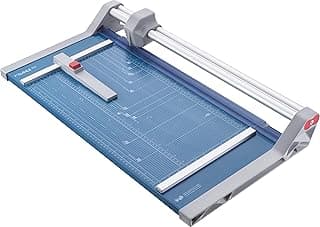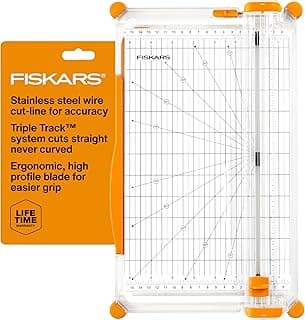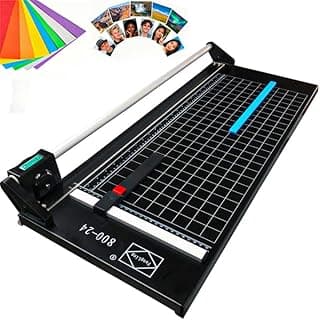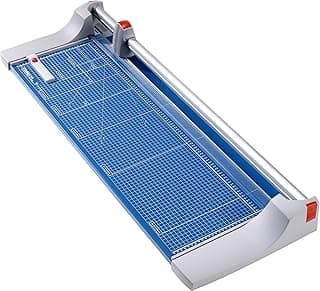

Buying Guide: Best Rotary Paper Trimmers for Offices
Offices often deal with stacks of flyers, reports, and memos that need precise cuts without slowing down workflows. Many buyers worry about trimmers that jam, dull quickly, or take up too much desk space, leading to frustration and wasted time. This guide breaks down key factors to help you pick a rotary paper trimmer that fits your office's real-world needs.
Cutting Capacity and Paper Size
Consider how much paper you typically handle daily. Rotary trimmers excel at clean, straight cuts on single sheets or small stacks, but capacity varies.
- If your office cuts up to 10 sheets of standard paper at once, aim for models with a 12-15 inch cutting length for letters and A4 sizes.
- For larger projects like posters, look for 18-inch or longer blades to avoid multiple passes.
- Avoid overkill on capacity if space is tight—thicker stacks can strain the blade and reduce precision over time.
Blade Quality and Durability
Blades wear out with heavy use, so prioritize materials that hold an edge during repeated office tasks like trimming memos or signage.
- Opt for rotary blades made of high-carbon steel, which generally stay sharp longer than basic alloys.
- If your team cuts coated or glossy paper often, choose models with replaceable or reversible blades to extend usability.
- Plan for replacements every 3-6 months in busy offices to prevent ragged edges that slow down finishing work.
Safety Features
Safety matters in shared office spaces where multiple people use the trimmer. Modern designs minimize risks without complicating operation.
- Look for blade guards that cover the edge during and after cuts—essential if trainees or temps will use it.
- Models with locking mechanisms prevent accidental activation, reducing injury worries in high-traffic areas.
- No installation needed for most desktop units; they set up in seconds on any flat surface, keeping things simple and safe.
Build Quality and Office Fit
A trimmer's construction affects longevity and how well it integrates into your workspace. Sturdy builds handle daily office volume better.
- Metal bases and rails offer stability for frequent use, unlike plastic ones that can wobble on stacks.
- Compact designs under 20 inches wide suit shared desks; larger ones work for dedicated mailrooms.
- Check weight—around 5-10 pounds balances portability without feeling flimsy.
Precision and Alignment Guides
Accurate cuts save time on revisions. Good guides ensure consistent results across various paper types.
- Seek adjustable rulers and grid markings calibrated in both inches and metric for versatile office needs.
- Magnetic or fold-out extensions help with longer sheets, preventing slippage during cuts.
- If precision is key for client materials, test for minimal blade play; this varies by model but impacts professional finishes.
Ease of Maintenance and Portability
Low-maintenance trimmers keep downtime short in fast-paced offices. Portability aids reorganization without hassle.
- Choose units with easy blade access for quick swaps—no tools required in most cases.
- Lightweight handles make them movable between stations; avoid heavy models unless fixed in place.
- Clean paper dust buildup regularly to maintain smooth operation—built-in trays simplify this task.
Frequently Asked Questions About Rotary Paper Trimmers for Offices
What are the best rotary paper trimmers for offices in terms of cost?
Rotary paper trimmers suitable for office use typically range from $30 to $150, depending on cutting capacity and build quality. If your office handles moderate daily volumes, a mid-range model around $60-90 offers the best value, balancing durability with features like adjustable guides. Higher-end options justify their cost for high-volume environments where precision and longevity reduce replacement needs.
How do rotary paper trimmers ensure safety in busy office settings?
Most office-grade rotary trimmers feature a protective rail over the blade to prevent accidental cuts, making them safer than guillotine styles for shared workspaces. Look for models with blade-locking mechanisms and non-slip bases if multiple users handle them daily. In practice, these safety elements minimize injuries even during rushed tasks, provided you follow basic guidelines like clearing the cutting area first.
Is installation or setup easy for rotary paper trimmers in offices?
Setup for rotary paper trimmers is straightforward and takes under 5 minutes—usually just unfolding the base, attaching the paper guide, and inserting the blade if needed. No tools or wall mounting are required, so you can place it directly on any desk or counter. For offices, this plug-and-play design means minimal disruption, though checking alignment on first use ensures accurate cuts from the start.
How efficient are rotary paper trimmers for office productivity?
Rotary trimmers excel in offices by delivering clean, straight cuts through stacks of 10-20 sheets in one pass, far quicker than scissors for bulk tasks like reports or flyers. Their smooth rolling action reduces effort and paper jams compared to other cutters, boosting efficiency during peak hours. If your team processes 50+ pages daily, opt for one with a longer cutting length to handle larger formats without repositioning.
How do rotary paper trimmers compare to other types for office use?
Compared to guillotine trimmers, rotary models provide superior precision for photos and fine documents but may cut fewer sheets at once in heavy-duty scenarios. They're generally quieter and safer for open office layouts, though less ideal for ultra-thick stacks where hydraulic cutters shine. For most offices prioritizing clean edges over sheer power, rotary trimmers strike the best balance of speed, safety, and versatility.
Conclusion
Selecting the best rotary paper trimmers for offices comes down to blade sharpness, cutting capacity, and sturdy build quality that handles daily workloads without jamming. Prioritize models with safety features and easy paper guides for precise, clean cuts every time.
With these key factors in mind, you're equipped to make a smart choice that boosts office efficiency. Take a moment to match your needs—volume, paper sizes, and space—and pick the trimmer that fits best for reliable performance.