
Buying Guide: Best Paper Trimmers for Offices
Offices often deal with stacks of flyers, reports, and marketing materials that need quick, precise cuts. Many buyers struggle with choosing between guillotine-style trimmers for high-volume tasks or rotary models for delicate work, leading to wasted time or uneven results. This guide breaks down the key factors to help you select a paper trimmer that fits your daily workflow.
Cutting Capacity and Paper Size
Cutting capacity determines how many sheets you can trim at once and the maximum paper size it handles, which directly impacts efficiency in busy office settings.
- If your office processes up to 20 sheets of standard paper (like 20lb bond), a medium-capacity trimmer keeps things moving without frequent reloading.
- For larger formats such as A3 or 12x18 inches, opt for models with extended rails to avoid multiple passes and misalignment.
- Avoid overpowered units for light use, as they add unnecessary bulk to your workspace.
In most cases, matching capacity to your average stack size prevents jams and speeds up repetitive tasks like preparing presentations.
Cut Type: Guillotine vs. Rotary
The cut mechanism affects precision, safety, and suitability for different materials, making it a core decision for office versatility.
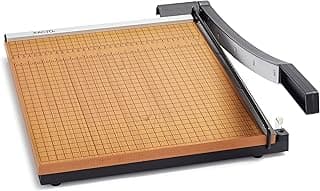
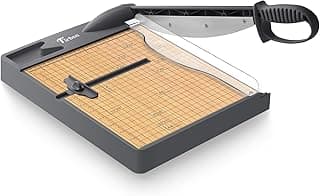
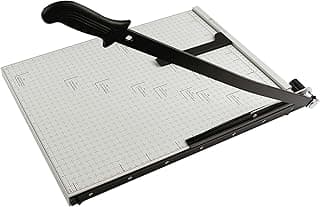
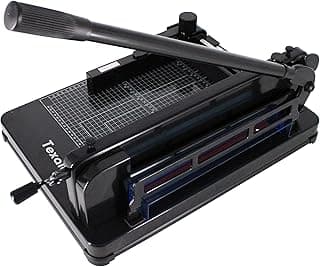
- Guillotine trimmers deliver straight, powerful cuts ideal for bulk paper stacks in mailrooms or print areas.
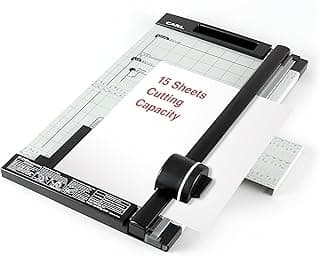
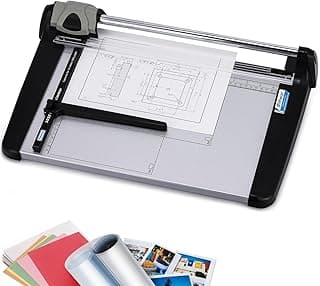
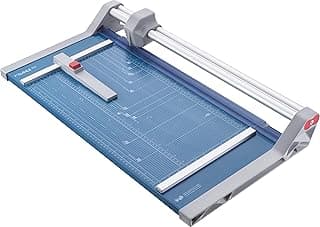
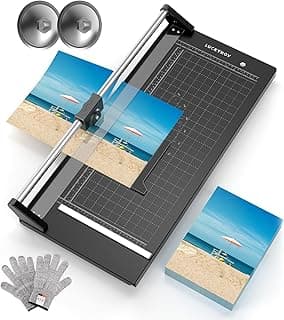
- Rotary blades offer smoother edges for photos, cardstock, or vellum, reducing fraying on creative projects.
- If precision matters more than speed, then rotary styles generally perform better for mixed-media tasks.
Consider your primary materials: guillotine for standard documents, rotary for anything requiring clean, professional finishes.
Safety Features
Safety prevents accidents in shared office spaces where multiple users, including non-experts, handle the trimmer daily.
- Look for blade guards, transparent clamps, and auto-lock mechanisms that secure the blade when not in use.
- Models with finger guards or hinged covers reduce injury risk during high-volume cutting.
- For offices with frequent visitors, prioritize trimmers certified to safety standards like those from industry testing bodies.
These features add peace of mind without complicating operation, especially if your team includes temporary staff.
Build Quality and Durability
A sturdy build ensures the trimmer withstands repeated use without loosening or warping, extending its lifespan in demanding environments.
- Metal bases and rails provide better stability than plastic for consistent cuts over time.
- Solid wood or reinforced frames resist wear from daily office handling.
- Avoid lightweight models if your space involves heavy foot traffic, as they shift easily.
For most offices, investing in durable construction means fewer replacements and reliable performance year after year.
Size, Portability, and Storage
Office desks and shelves have limited space, so the trimmer's footprint affects where it can live without disrupting workflows.
- Compact desktop models (under 20 inches wide) suit small teams or individual workstations.
- Freestanding units with fold-down arms work well for shared areas, folding away when idle.
- If mobility is key, then lightweight designs with handles make it easy to move between rooms.
Measure your available counter space first to ensure the trimmer integrates seamlessly without cluttering high-traffic zones.
Blade Sharpness and Maintenance
Sharp blades ensure clean cuts over time, while easy maintenance keeps downtime minimal in fast-paced offices.
- Soluble or replaceable blades maintain performance without frequent sharpening.
- Models with quick-swap systems allow changes in seconds, ideal for high-use scenarios.
- Check for self-sharpening options if your office cuts varied thicknesses regularly.
Simple upkeep routines, like occasional cleaning, prevent dull edges that lead to ragged cuts and frustration.
Price and Long-Term Value
Balancing upfront cost with features ensures you get reliable performance without overspending for unused capabilities.
- Entry-level trimmers around $50–$100 handle basic office needs effectively.
- Mid-range options ($100–$300) add durability and capacity for growing teams.
- If volume exceeds 500 cuts weekly, then higher-end models justify their cost through longevity.
Focus on total value: a trimmer that matches your usage saves money over time by reducing replacements and errors.
Frequently Asked Questions About Paper Trimmers for Offices
What should I consider when choosing the best paper trimmers for offices on a budget?
Look for models under $100 that offer at least 12-inch cutting lengths and handle 20-30 sheets at once, as these balance cost and daily office needs without frequent jams. In most cases, guillotine-style trimmers provide the best value for light to moderate use, saving money compared to pricier rotary options. Prioritize durable blades that stay sharp longer to avoid replacement costs down the line.
Are office paper trimmers safe for shared workspaces?
Yes, the safest options feature blade guards, finger guards, and locking mechanisms that prevent accidental cuts, especially important in busy offices with multiple users. Rotary trimmers tend to be safer for high-traffic areas since they use a rolling wheel instead of a swinging blade. Always check for non-slip bases to keep the unit stable during cuts.
How easy is it to set up a paper trimmer for office use?
Most come fully assembled or require just attaching a side rail and clamping down screws, taking under 10 minutes with basic tools like a screwdriver. No complex installation is needed—just place it on a sturdy desk or cart away from edges. If your office has heavy daily volume, opt for ones with pre-aligned guides to skip calibration hassles.
Which type of paper trimmer is most efficient for office tasks?
Guillotine trimmers excel for straight, high-volume cuts on stacks of paper, making them ideal for reports and flyers, while rotary models handle photos and crafts more precisely but slower for bulk jobs. For offices, choose based on workload: guillotines for speed, rotaries for accuracy on smaller batches. Efficiency improves with self-sharpening blades that maintain clean edges over thousands of cuts.
How do guillotine paper trimmers compare to rotary ones for office settings?
Guillotine trimmers cut thicker stacks faster and cheaper for everyday documents, but rotary versions offer safer, smoother edges for creative or precise work like business cards. If your office prioritizes volume over finesse, guillotines win on efficiency; otherwise, rotaries reduce waste from ragged cuts. Both work well, but test cut capacity against your typical paper loads before buying.
Conclusion
Selecting the best paper trimmers for offices comes down to balancing blade sharpness, cutting capacity, safety features, and ease of use for your team's needs. Prioritize models with sturdy builds and precise guides to ensure clean, efficient cuts every time.
With these key factors in mind, you're well-equipped to make a confident choice that boosts office productivity. Take a moment to match the options to your workflow, and invest in a reliable trimmer that delivers long-term value without hassle.