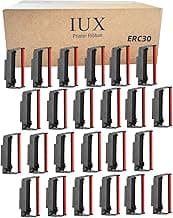

Buying Guide: Best Impact Printer Ribbons
Choosing impact printer ribbons can feel overwhelming if you're replacing worn-out ones or upgrading for heavier use, especially with options varying in yield, color, and compatibility. Many users worry about mismatches causing faded prints or frequent swaps, but focusing on a few key factors helps narrow it down to reliable choices for your setup.
Compatibility with Your Printer Model
Impact printers differ in ribbon slot size and mechanism, so an ill-fitting ribbon leads to installation hassles or no printing at all. Always check your printer's manual or model specs first.
- If your printer uses a specific cartridge shape, like a standard 4x6 inch or shuttle-style, match that exactly to avoid jams.
- For multi-part forms, ensure the ribbon supports the required width, typically up to 12 inches.
- Tip: Measure your current ribbon if unsure—better safe than dealing with returns.
Ribbon Yield and Capacity
Ribbon yield determines how many pages you print before replacement, directly affecting downtime and long-term costs. Low-yield options suit light use, but higher capacity pays off for frequent printing.
- Look for yields around 3–5 million characters for moderate office tasks.
- If you print 500+ pages daily, opt for extended-life ribbons to minimize interruptions.
- Avoid very low-yield (1 million characters) unless it's a one-off need—they add up quickly.
Single-Color vs. Multi-Strike Ribbons
Color options impact print clarity: black for crisp text, multi-color for forms or labels. Multi-strike ribbons endure more passes over the same spot, ideal for carbonless copies.
In most cases, black nylon ribbons offer durability for high-volume monochrome printing. If handling invoices with color coding, then choose a four-color (black, red, blue, green) variant for versatility without sacrificing speed.
Material Type and Durability
Ribbon material affects longevity and performance—nylon lasts longer than fabric or Mylar in demanding environments. Dust or heat can wear cheaper materials faster.
- For dusty warehouses, pick nylon-corrected ribbons; they resist smudging better.
- In clean offices, standard fabric works fine and costs less upfront.
- Generally, multi-pass rated ribbons (e.g., 3–9 strikes) suit repetitive printing to prevent fading.
Cost Per Page and Bulk Options
Upfront price grabs attention, but calculate cost per character or page for true value. Bulk packs reduce per-unit expense for steady users.
- Expect $5–15 per ribbon; divide by yield for accurate comparison.
- If printing under 100 pages weekly, single packs suffice; otherwise, bulk saves 20–30%.
- Skip deals that seem too cheap—they often mean lower yield or quality.
Installation Ease and Reinking Potential
Some ribbons are cartridges for quick swaps, others need manual installation or reinking. Ease matters if you're not tech-savvy.
For most users, pre-filled cartridges drop in like ink jets—no mess. If your budget is tight and volume high, then reusable ribbons that allow reinking extend life, though they require careful handling to avoid spills.
Best Impact Printer Ribbons FAQ
Are impact printer ribbons worth the cost compared to ink cartridges?
In most cases, impact printer ribbons offer excellent value for high-volume printing because they last for thousands of pages without drying out or clogging, unlike ink cartridges that can waste money on replacements. You'll typically spend less per page, especially if you print receipts or multi-part forms regularly. If your needs are low-volume, though, the upfront cost might feel higher initially.
How do I know if replacement ribbons are safe for my impact printer?
Compatible impact printer ribbons are generally safe as long as they match your printer's model specifications for size and type, preventing damage from improper fit. They use non-toxic inks that won't harm the print head or cause fumes in normal use. Always check for quality indicators like consistent ribbon tension to avoid jams or wear.
What's the easiest way to install impact printer ribbons?
Installation usually takes under 2 minutes: open the printer cover, remove the old ribbon cartridge by gently pulling it out, slide the new one into the same slots until it clicks, and advance the ribbon manually if needed. If your printer has a ribbon guide, align it properly to ensure even feeding. Most users find it straightforward with no tools required, even on older models.
How efficient are the best impact printer ribbons for everyday use?
The top impact printer ribbons deliver crisp, durable prints that resist smudging on paper or forms, making them ideal for invoices or labels that need longevity. They maintain consistent quality over their full lifespan, often 2-5 million characters depending on the type. For efficiency, choose ones with black or multi-strike formulas if you need bolder output without frequent changes.
What should I look for when comparing different impact printer ribbons?
Compare based on yield rating, such as characters per ribbon, and fabric type—nylon for standard use or mylar for longer life in demanding environments. Factor in color options if you print forms, and opt for those with easy-feed mechanisms to minimize downtime. In general, higher-rated ribbons balance cost and performance better for frequent users.
Conclusion
Choosing the best impact printer ribbons comes down to matching compatibility, print yield, and durability to your specific needs. High-quality ribbons deliver crisp, reliable output while minimizing downtime and costs over time.
With the right selection, you can count on consistent performance for your dot matrix or impact printers. Take a moment to review your printer model and usage—then confidently pick the option that fits best for long-term efficiency.