Buying Guide: Best Curved Gaming Monitors
Many gamers hesitate when considering curved gaming monitors, worried about whether the curve adds real value or just complicates setup and viewing. In practice, these monitors can enhance immersion for extended sessions, but choosing the right one depends on your desk space, gaming habits, and budget. This guide breaks down the key factors to help you decide confidently without common pitfalls.
Screen Size and Curve Radius
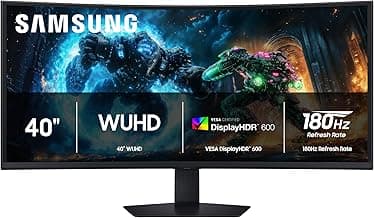
Screen size affects how enveloping the curve feels during gameplay. Larger screens like 34 inches or more suit multi-monitor replacements, pulling you deeper into races or battles, but they demand more desk depth.
- If your setup is compact, opt for 27-32 inches to avoid overwhelming your space.
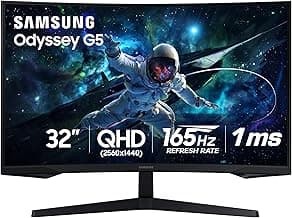
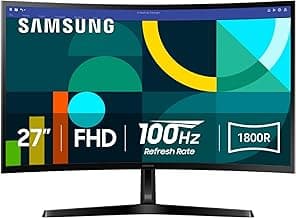
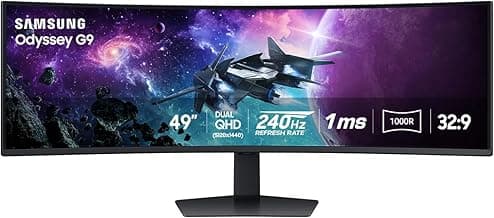
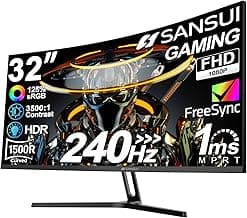
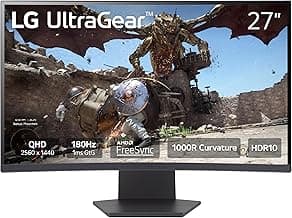
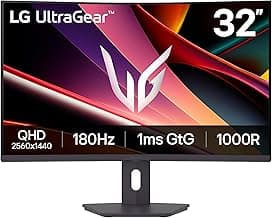
- Curve radius matters too—a tighter 1000R to 1500R wraps around your vision for most users, while wider radii like 1800R work better for shared or productivity use.
Avoid extremes if you switch between gaming and work; test in-store if possible to match your viewing distance.
Resolution and Aspect Ratio
Higher resolution delivers sharper details in fast-paced games, reducing eye strain over long hours. For curved gaming monitors, 3440x1440 (WQHD ultrawide) strikes a balance for immersive play without taxing mid-range hardware.
- Choose 2560x1440 (QHD) if your GPU struggles with 4K, as it maintains fluidity in titles like shooters.
- Ultrawide 21:9 ratios expand peripheral vision, ideal for sim racing, but stick to 16:9 for competitive esports where straight sightlines matter.
Match resolution to your graphics card to prevent frame drops—generally, aim for what your system can sustain at 144Hz or higher.
Refresh Rate and Response Time
Refresh rate determines smoothness, crucial for reacting in real-time games. 144Hz to 240Hz panels reduce motion blur, making curved edges feel more natural during pans.
- If you play competitively, prioritize 1ms response times to minimize ghosting.
- For casual or single-player games, 120Hz with 2ms suffices and saves cost.
Verify adaptive sync support like FreeSync or G-Sync compatibility to eliminate tearing, especially on curved surfaces where inconsistencies stand out.
Panel Type and Color Performance
Panel technology influences contrast and color in dark scenes. VA panels offer deeper blacks for cinematic games, while IPS provides wider angles if you view off-center.
- Select VA for moody atmospheres in RPGs, but expect slight smearing in rapid motion.
- IPS suits vibrant, color-accurate titles if sharing the screen.
Look for at least 90% DCI-P3 coverage if HDR matters—curves amplify color pop, but only if your room lighting cooperates.
Connectivity and Ergonomics
Modern ports ensure future-proofing. HDMI 2.1 and DisplayPort 1.4 handle high refresh rates, while USB hubs add convenience for peripherals.
- Adjustable stands reduce neck strain during marathon sessions—height, tilt, and swivel are practical for most desks.
- Wall-mount compatibility helps if desk space is tight.
Skip basic stands if you game daily; VESA compatibility lets you upgrade ergonomics easily.
Budget and Long-Term Value
Prices range from $300 for entry-level to over $1000 for premium features. Factor in power draw—efficient models keep electricity costs low for daily use.
- Mid-range $500-$800 options deliver the most value for immersive gaming without overkill.
- Check warranty length, as 3 years covers burn-in risks on OLED variants.
If upgrading from flat monitors, start mid-tier to test the curve; resale value holds well for well-specced units.
Frequently Asked Questions About the Best Curved Gaming Monitors
What is the typical cost range for top curved gaming monitors?
Curved gaming monitors that deliver smooth performance and immersive visuals usually start around $300 for solid 27-inch options with 144Hz refresh rates, climbing to $800 or more for premium 34-inch ultrawides with higher specs like 240Hz and better color accuracy. If you're on a budget, focus on models with at least QHD resolution to avoid compromising too much on quality. In most cases, spending $400–600 gets you the best value for competitive gaming without unnecessary extras.
Are curved gaming monitors safe for long gaming sessions?
Yes, modern curved gaming monitors are designed with eye safety in mind, featuring flicker-free technology and low blue light filters to reduce strain during extended play. If you game for hours, enable these built-in modes and follow the 20-20-20 rule—every 20 minutes, look 20 feet away for 20 seconds. They're generally safer than flat screens for immersion, as the curve matches your natural eye movement, minimizing distortion and fatigue.
How easy is it to install a curved gaming monitor?
Installation is straightforward for most curved gaming monitors, typically involving a quick VESA mount compatibility check and attaching to your existing arm or stand in under 10 minutes. If your desk lacks space, opt for models with adjustable stands that support height, tilt, and swivel right out of the box. Always secure cables properly to avoid strain, and consult the manual for any model-specific quirks like bezel alignment.
How do curved gaming monitors compare to flat ones for gaming?
Curved gaming monitors excel in providing deeper immersion and wider perceived field of view, making fast-paced games feel more engaging compared to flat panels, especially on larger screens over 32 inches. Flat monitors might edge out in uniformity for precision work, but for gaming, the curve reduces edge distortion if you sit at the recommended distance of 2–3 feet. Choose curved if multiplayer battles or racing sims are your focus; otherwise, flat suffices for casual use.
What specs matter most for efficiency in curved gaming monitors?
For efficiency, prioritize at least 144Hz refresh rates paired with 1ms response times to ensure buttery-smooth gameplay without ghosting, plus adaptive sync to match your GPU and cut power waste. Higher resolutions like 1440p balance sharpness and performance better than 4K on mid-range hardware, keeping frame rates high. In practice, these specs make sessions more efficient by reducing input lag and heat buildup during marathon plays.
Conclusion
Choosing the best curved gaming monitors comes down to balancing immersive curvature, high refresh rates, responsive panels, and sharp resolutions that match your setup and budget. Prioritize models with minimal input lag and wide viewing angles for seamless gameplay.
With these key factors in mind, you're well-equipped to make a confident decision tailored to your needs. Take a moment to compare specs and pick the one that elevates your gaming experience—your next level-up awaits.